ngHelperAirbrake: Airbrake for AngularJS

Airbrake is a well known exception tracker which is used from thousands of users. A cool thing is that the Airbrake team also supports browser based javascript exception. Integrating these kind of javascript code gives AngularJS developers sometime a headache. The newest member of the ngHelper collection, the ngHelperAirbrake component makes it super simple and easy to integrate Airbrake in an existing AngularJS application.

It’s a bower component and works well with scaffolding tools like Yeoman. Installing the component is possible with the following command line:

bower install ng-helper-airbrake –save

After that the component is registered in the bower.json of the project. Moving up the dependency entry to the position right after the inclusion of angular ensures that the Airbrake-Shim is loaded as early as possible when doing a full page reload.

“dependencies”: {
“angular”: “~1.3.8”,
“ng-helper-airbrake”: “~0.1.0”,

ngHelperAirbrake offers the $airbrake angular service which allows to configure the different Airbrake settings. The documentation at our project page describes how to set the right configuration: https://github.com/ngHelper/ngHelperAirbrake

After configuring the project everything works as expected and Airbrake receives exception from the AngularJS application.

Pit-Falls when you integrate Twitter, Facebook or other social networks

Today I received a request from a platform to vote for a specific product. I was willing todo this, because I’m using it every day and I’m really happy with that.

With this kind of sentences discussions about failed social media integration start. In a world where many people are very concerned about their own data privacy a “but” follows very fast:

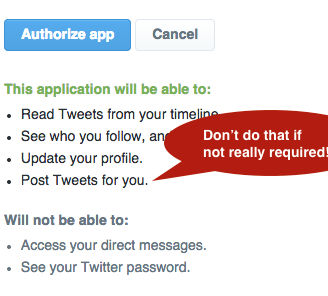
Currently I can’t do that because the website enforces me to authorise via Twitter or Facebook. This would be doable if they only request the rights they really need. I will not allow every system to post in my name because that’s very personal.

At the end of the story you as a service provider loose a customer on the click path for only one reason: You tried to get more rights as you typically need to operate your application. And from my own experience the right to post in the name of someone requires a strong trustworthy relationship.

Screen Shot 2015-03-06 at 07.32.16

Neither Twitter nor Facebook enforces any developer to request more rights than they really need. I did a lot of Twitter integrations and whenever you are doing this please check the FAQ of the identity provider of your choice clearly and follow the principal of minimal privileges.

Following this ideas you will loose less people on click path to your voting system!

Update expired Azure EA tokens easily

The Microsoft Azure EA portal issues an Azure EA security token for API access to the cost & usage data. This token expires every 6 month and because of that needs to be renewed in the Azure Cost Monitor on a regular basis. The Azure Cost Monitor team started the project about 5 months ago what means that the first Azure EA security tokens will expire soon. Because of that, we are pleased to announce the launch of the token update wizard which makes it as easy as possible to renew expired Azure EA tokens:

azure-ea-token-settings

From today, the dashboard of the Azure Cost Monitor warns every user when the token is expired to ensure that every administrator always stays informed:

azure-ea-token-warning

If you don’t update an expired token, the system stops syncing data from the Azure EA portal. As soon as the token is valid again the system is able to sync data from the Azure EA portal and is doing that automatically within the next sync cycle over night. We will also get the missed data from the days the token was expired. So no worries when you were in vacation or absent for a couple days.

We hope this feature makes it simple to maintain your Azure Cost Monitor account and makes it much easier for you to manage and control all costs. Any questions, wishes or ideas? Try our feedback portal or drop a mail to tickets@azurecostmonitor.uservoice.com.

Azure: Do never use EF automigrations when working in teams

Todays number one approach in building database access libraries on ASP.NET based applications is the Entity Framework. Since Microsoft supports migration based database updates, which mostly look like copied from the approach Ruby on Rails offers since ages, it’s possible to use them in scenarios where continuous deployment is key.

The core model which fits perfectly into a development process around continuous delivery & deployment is a code-first approach. This means that the developer creates so called POCOs (Plain Old C# Object) and the system is able to generate the needed SQL changes, based on the current state of the database.

The Entity Framework has two options to generate the migration:

  1. Auto Migrations
    The Entity Framework tries to generate the database changes on runtime without any specific migrations implemented as code. Everything happens magically 😦
  2. Explicit Migrations
    The Entity Framework just runs the migration scripts written in a .NET based special DSL for database operations. Nothing happens magically 🙂 This needs the developers brain but is controllable even in large teams.

When you work in a team Auto Migrations are really a bad idea and should be disabled from the beginning. Assume developers do changes manually in the database which means the magic around AutoMigrations will generate a different set on instructions against this database as the next developer will get. The results of auto migrations in team environments are not reliable and repeatable.

So it’s a really good idea to disable automatic migrations from the start:

public Configuration()  {
AutomaticMigrationsEnabled = false;
}

Auto Migrations do not have a win at all when it comes to projects with more than one developer or projects which are deployed automatically. Continuous deployment relies on a strict unit of work and as less magic as possible. This will also help to troubleshoot when the continuous deployment breaks the production and a rollback is required.

Microsoft also published a nice article with more information at the MSDN: http://msdn.microsoft.com/en-US/data/jj554735.aspx

Update: Deploy AngularJS-Apps to Azure WebSites with Codeship

A couple of weeks ago I wrote a tutorial on how to deploy an Angular.js application into Azure WebSites. I explained why the simple GitHub deployment that comes with Azure is not usable and how Codeship as shipping service can do the magic for every team.

Since this article I started using Codeship more extensive and since it’s a part of my daily business I don’t want to miss it at all. Here @Matrix42 HackWeek, Codeship was the most chosen solution to implement AdHoc continuous deployment. I would not be suprised when we replace our traditional TFS build agents in the next months 🙂

To make it more intuitive and easy for everybody who works with node and a javascript task runner, I decided to transform the illustrated deployment script into a node module. The Azure-Deploy module is super simple to integrate in existing NPM driven projects and can be added to existing javascript tasks as well. At the end the system offers a simplified usage like this:

grunt deploy:production

This result is more simple to integrate into the deployment scripts of Codeship than everything else. The shell script of course works but this component gives you the freedom to stay with the current task runner of your choice. To get more information visit the github page for this project: https://github.com/dei79/node-azure-deploy

Manage costs in your local currency – Azure Cost Monitor supports multiple currencies

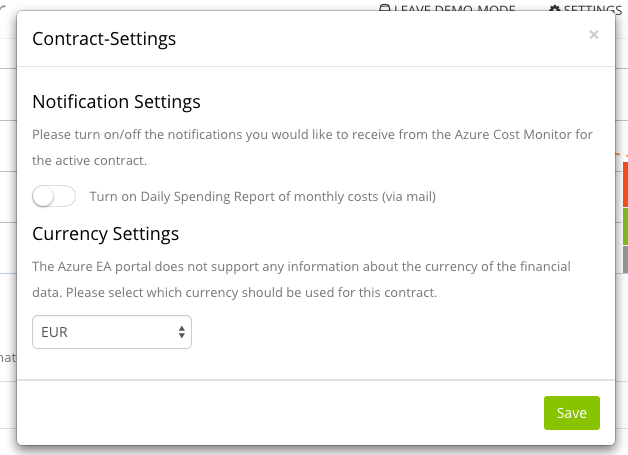
The azure cost monitor team is pleased to announce the launch of the multi currency support. This  feature has been built to reflect what our users told us they need:

acm_currency

Currently the Microsoft Azure EA portal does not give any information about the currency of the financial data. Because of that the azure cost monitor displayed all costs in EUR in the past. Now the new multi currency support allows to switch between different currencies.

We hope this feature brings more transparency in your Azure Cloud Spendings and makes it much easier for you to manage and control all costs. Any questions, wishes or ideas? Try our feedback portal or drop a mail to tickets@azurecostmonitor.uservoice.com.

Azure Storage: Is the Geo Redundant Mode really required?

Microsoft Azure offers different replication modes for Azure Storage. Every mode approximately doubles the costs for a TB of data. During a great workshop with Patrick Heyde we talked about stamp copies and I asked myself which mode I really needed.

First I took one step back, to identify all requirements I typically have in my projects for a highly scalable, fault safe, redundant storage :

  • When a hard-drive in a storage server brakes, my data still needs to be usable.
  • When Microsoft has huge power outage on a whole datacenter, I want to bring my app up and running again in another datacenter.
  • When I (or my customers) are removing data by accident, there needs to be an option to revert to a former snapshot.

So a review of the different replication modes compared to these requirements leads me to the following results:

When a hard-drive in a storage server brakes, my data still needs to be usable:
The Local Redundant Storage fulfils this requirement perfectly. Microsoft writes 3 different copies of every bit within one single data center. When a hard drive on a stamp or the whole stamp goes down, another one can take over and all data is available without any interruption.

When Microsoft has huge power outage on a whole datacenter, I want to bring my app up and running again in another datacenter:
Microsoft offers a geographical redundant storage mode that stores another 3 copies in another datacenter a hundred miles away. This helps a lot, because every application can use the secondary location to access to the data – but is it worth the price? The price for GRS is three times higher then for LRS.
An automated replication between two different LRS storages, hosted in a Azure WebJob might be a good solution the fulfill the requirement as well.

When I (or my customers) are removing data by accident, there needs to be an option to revert to a former snapshot:
Globally Redundant Storage is not helpful when it comes to removing data by accident. As soon as the data is removed from the primary storage, the system removes the data in the backup location as well, often within seconds.
But this requirement can also be fulfilled with a replication between two different LRS storages, as already described above. The whole application needs to be designed for this use cases.

So this review brings me to the conclusion that in my personal opinion GRS storage is not needed in most of the use cases. Normally several LRS storages and an application logic optimised on the specific data security requirements works well and preserves the budget.

What’s your opinion? Do you have use cases where GRS and Read-GRS are hard requirements? If you like, leave a short comment …
Azure Cost Monitor: Daily Spending Reports – a first résumé

A couple of days ago, on January 17th, the new Daily Spending Report Feature of the Azure Cost Monitor went live.

We are very pleased that the reports were adopted so well. We got some nice feedback from our users appreciating the new functionality.

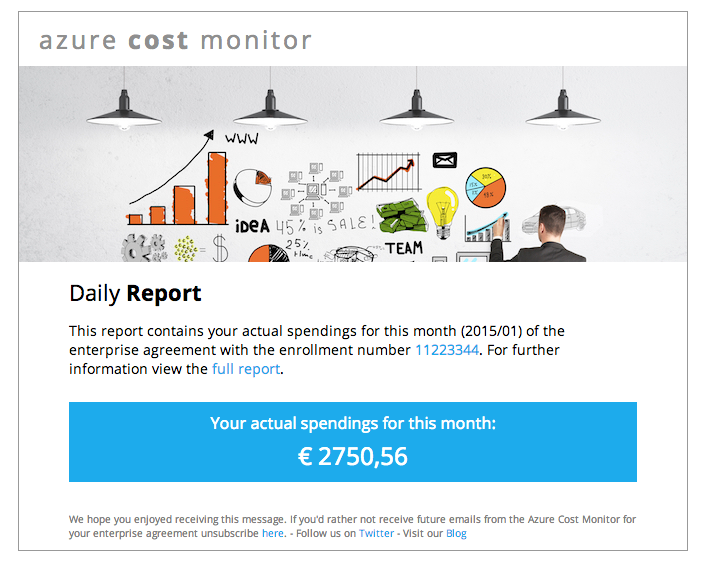
spending-report-demo

This feature has been build to reflect what our users told us they need – a simple way of tracking all Azure cloud costs on a daily basis and transparency for every stakeholder in the company.

The daily spending reports make it easy for the Operations Department to track the cloud spendings and react upon this data immediately.

Controllers of the Finance Department need to understand what the company is spending throughout the month. Azure Cost Monitor reports give them a convenient way to have a good overview on a daily basis.

Managers always need to be aware about the most important KPIs within the company. The new daily spending reports of the Azure Cost Monitor give them the freedom to always have a quick and precise overview on the company’s cloud spendings.

Whenever you’ve got any questions, wishes or further ideas please don’t hesitate and let us know by leaving a message or request them in our feedback portal.

azure-queue-client: build azure queue based workers in node.js

Microsoft Azure offers a very powerful and cheap queueing system based on Azure Storage. As a node developer the challenge is to build a simple to use system which is able to consume messages from the azure queue. The Azure Cost Monitor is for instance using this module to process all costs analytic tasks in the backend.

The module azure-queue-client is able to implement this in a couple of simple steps. It supports multiple workers in different processes and on different machines. The following example illustrates the usage:

// config with your settings
var qName = ‘<<YOURQUEUENAME>>’;
var qStorageAccount = ‘<<YOURACCOUNTNAME>>’;
var qStorageSecret = ‘<<YOURACCOUNTSECRET>>’;
var qPolling = 2;

// load the modules
var queueListener = require(‘azure-queue-client’).AzureQueueListener;
var q = require(“Q”);

// establish a message handler
queueListener.onMessage(function(message) {
  var defer = q.defer();

console
.log(‘Message received: ‘ + JSON.stringify(message));
defer.resolve();

return
defer.promise;
});

// start the listening
queueListener.listen(qName, qStorageAccount, qStorageSecret, qPolling, null);

Developers who are using the Azure Scheduler might recognize that the payload of the scheduler is encapsulated in a XML wrapper. This XML wrapper can be handled by the module as well so that it doesn’t matter if the message comes from an other queue client or the Azure Scheduler.

This module makes writing job workers in node, hosted on Azure or any other cloud provider a breeze.

Stay up to date – Azure Cost Monitor starts sending daily spending reports via mail

The azure cost monitor team is pleased to announce the launch of the daily spending mail reports starting January 17th. This great feature has been crafted to reflect what our users told us they need and it also builds upon new technology capable of addressing future needs:

spending-report-demo

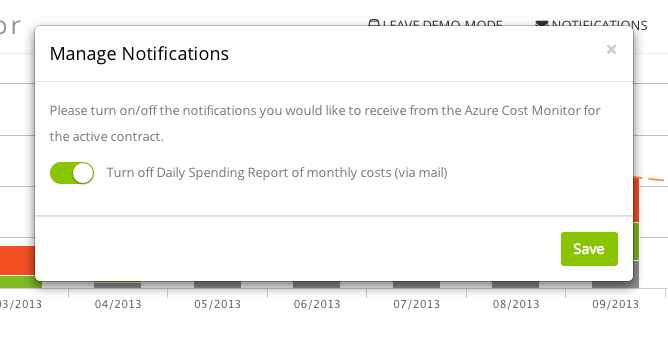
The report will be send once a day, at about 03:00 AM CET. If – for any reason – you do not wish to get the daily reports, it’s of course possible to disable the reports in the new notifications section of the Azure Cost Monitor portal:

notifications

We hope this feature brings more transparency in your Azure Cloud Spendings and makes it much easier for you to manage and control all costs.
Any questions, wishes or ideas? Try our feedback portal or drop a mail to tickets@azurecostmonitor.uservoice.com.