Build your own Twitter – Part 3 – Azure Timeline Service for Node.js

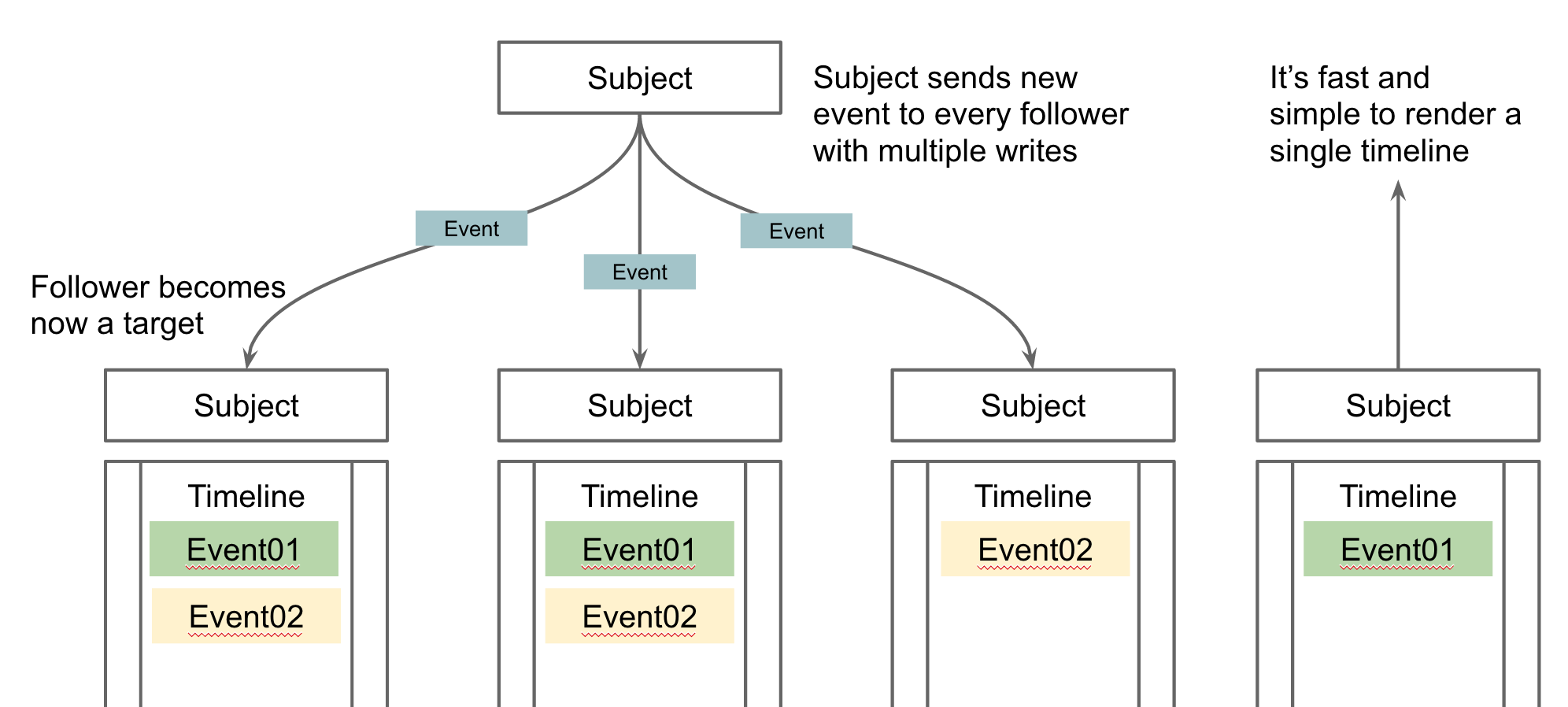
The last part of this article series described the principles of Twitter-like services based on Azure Storage Tables. This part now describes the structure of a new node module which acts as a timeline service. This service can be used very easily in existing node projects.

To integrate this node module just install the azure-timeline-service via node package manager. This integrates everything that is required automatically:

npm install azure-timeline –save

The module allows to post events to a specific user timeline and the timeline of all followers. The following snip-let illustrates it:

var user = azureTimelineService.createSubject(“<>”, “<>”);

user.postEvent(‘login’, { timestamp: new Date() }).then(function() {
console.log(“DONE”);
});

Every method works asynchronous based on promises. Following another user is as simple as posting an event to a timeline

user.follow(user01).then(function() {
console.log(“DONE”);
})

Following a user means all events this user posts to a timeline will be posted to the followers timeline as well. Last but not least loading a timeline is important. The system returns currently all events from a timeline which is a point of change in the future:

user.loadTimeline().then(function(events) {
console.log(events);
})

All samples are implemented in the sample file of the Azure Timeline project here. Any questions? Feel free to open an issue at GitHub or just stay in touch via this block.

ngHelper-Toolbar: Now supports secondary actions & dividers

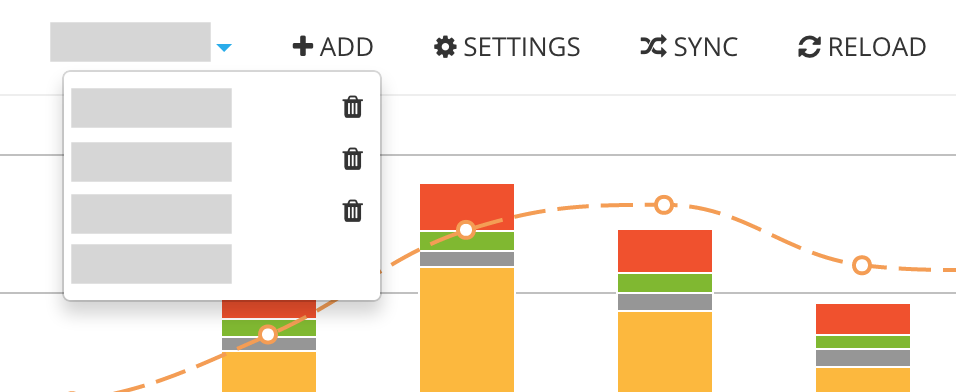
The $toolbar service is a great helper when it comes to building toolbars in AngularJS applications. The new version 0.0.3 allows you to handle new secondary actions, as shown here in the Azure Cost Monitor application:

secondary-actions

The secondary action can be defined in the addItem function similar to all other options the API supports:

$toolbar.addItem(‘childContract, contract, null, null, true, ‘/report/1234’, null, ‘activeContract’, ‘fa-trash’, function () {                   $scope.removeContract(contract);
});

Making the menu more user-friendly can be achieved by adding dividers in the structure. When using the special menu title “DIVIDER” the system will use this in the menu structure as divider:

$toolbar.addItem(‘user.divider’, ‘DIVIDER’, null, null, true, null, null, ‘user’);

The new navigation infrastructure of the Azure Cost Monitor is using the $toolbar service from the ngHelper-Toolbar project. We hope this feature makes it simple to maintain your toolbars. Any questions, wishes or ideas? Try the issue button on the GitHub page or contact the author via this blog.

Build your own Twitter – Part 1 – A timeline service with Azure Table Store

The Azure Cost Monitor and many other cloud services I’m working on, needed a timeline service to present aggregated events and actions similar to an audit trail. When I was thinking about this, it came to my mind that the requirements I had were very similar to a Twitter feed but with less features.

Let’s recap what is needed to build a timeline service in general:

  1. The Timeline
    The Timeline is associated with a subject and contains tons of events happened and triggered by other subjects the timeline owner follows.
  2. The Event
    The Event is the incident that happens in the real world and is stored in different timelines. This means every follower of a subject will get the event in his own timeline. So a single event can be stored in many different timelines.
  3. The Subject
    The Subject is someone or something which triggers an event. Normally it is a natural person with an own timeline but it could also be a piece of hard/software.
  4. The Target(s)
    The Targets are subjects with a timeline who are following other subjects. This means every subject becomes a follower or target as soon as it is following an other subject. Posting an event then means sending the message to the timeline of every subject following the sender.

The following picture should give a good overview about the entities in the timeline service:

Screen Shot 2015-03-21 at 10.40.15

Starting with this definitions in mind it’s possible to identify components needed for building a timeline service:

  • Storage for the timeline 
    The storage for the timeline needs to be able to offer a very fast read performance and an OK write performance. The performance should especially not be dependent from the amount of data in the system. I chose Azure Table Store for this because I can store the information in different partitions and get a clear read performance SLA for every partition. In addition to this it’s totally cheap and payable – also for startups.
  • Access broker to the storage 
    Normally NoSQL storage which can be used for timeline access needs a little helper to manage access. In general a RESTful web-service acts as an access broker and hands out pre-signed links to the timeline content. This ensures that no timeline data needs to go through the timeline service at all. Only the pre-authorised access links will be generated for the system. This also means that at the end the client SDK needs to handle the raw data for the timeline. This makes it a bit more complicated but it lets the performance stay in a good range. An other important operation needs to be implemented in the Access broker as well: Posting events to the subjects followers is a slow and complex operation the system needs to implement with a direct server call normally executed asynchronous with the help of a worker job.
  • Metadata storage for subject and targets
    Last but not least the combination of subject & targets needs to be stored somewhere in the backend. Azure Table Store can be used for this as well. All the operations to create a follow-ship can be implemented in the timeline service as well but not the rights & permission checks to post or create relations because the timeline service should be used machine-2-machine with API tokens.

The following graphic shows the technical architecture of a good scalable timeline service based on Azure services:

arch-timeline

The next part of this tutorial will focus on the correct and scalable table structure based on Microsoft Azure Table Storage.

ngHelperAirbrake: Airbrake for AngularJS

Airbrake is a well known exception tracker which is used from thousands of users. A cool thing is that the Airbrake team also supports browser based javascript exception. Integrating these kind of javascript code gives AngularJS developers sometime a headache. The newest member of the ngHelper collection, the ngHelperAirbrake component makes it super simple and easy to integrate Airbrake in an existing AngularJS application.

It’s a bower component and works well with scaffolding tools like Yeoman. Installing the component is possible with the following command line:

bower install ng-helper-airbrake –save

After that the component is registered in the bower.json of the project. Moving up the dependency entry to the position right after the inclusion of angular ensures that the Airbrake-Shim is loaded as early as possible when doing a full page reload.

“dependencies”: {
“angular”: “~1.3.8”,
“ng-helper-airbrake”: “~0.1.0”,

ngHelperAirbrake offers the $airbrake angular service which allows to configure the different Airbrake settings. The documentation at our project page describes how to set the right configuration: https://github.com/ngHelper/ngHelperAirbrake

After configuring the project everything works as expected and Airbrake receives exception from the AngularJS application.

Azure: Do never use EF automigrations when working in teams

Todays number one approach in building database access libraries on ASP.NET based applications is the Entity Framework. Since Microsoft supports migration based database updates, which mostly look like copied from the approach Ruby on Rails offers since ages, it’s possible to use them in scenarios where continuous deployment is key.

The core model which fits perfectly into a development process around continuous delivery & deployment is a code-first approach. This means that the developer creates so called POCOs (Plain Old C# Object) and the system is able to generate the needed SQL changes, based on the current state of the database.

The Entity Framework has two options to generate the migration:

  1. Auto Migrations
    The Entity Framework tries to generate the database changes on runtime without any specific migrations implemented as code. Everything happens magically 😦
  2. Explicit Migrations
    The Entity Framework just runs the migration scripts written in a .NET based special DSL for database operations. Nothing happens magically 🙂 This needs the developers brain but is controllable even in large teams.

When you work in a team Auto Migrations are really a bad idea and should be disabled from the beginning. Assume developers do changes manually in the database which means the magic around AutoMigrations will generate a different set on instructions against this database as the next developer will get. The results of auto migrations in team environments are not reliable and repeatable.

So it’s a really good idea to disable automatic migrations from the start:

public Configuration()  {
AutomaticMigrationsEnabled = false;
}

Auto Migrations do not have a win at all when it comes to projects with more than one developer or projects which are deployed automatically. Continuous deployment relies on a strict unit of work and as less magic as possible. This will also help to troubleshoot when the continuous deployment breaks the production and a rollback is required.

Microsoft also published a nice article with more information at the MSDN: http://msdn.microsoft.com/en-US/data/jj554735.aspx

Update: Deploy AngularJS-Apps to Azure WebSites with Codeship

A couple of weeks ago I wrote a tutorial on how to deploy an Angular.js application into Azure WebSites. I explained why the simple GitHub deployment that comes with Azure is not usable and how Codeship as shipping service can do the magic for every team.

Since this article I started using Codeship more extensive and since it’s a part of my daily business I don’t want to miss it at all. Here @Matrix42 HackWeek, Codeship was the most chosen solution to implement AdHoc continuous deployment. I would not be suprised when we replace our traditional TFS build agents in the next months 🙂

To make it more intuitive and easy for everybody who works with node and a javascript task runner, I decided to transform the illustrated deployment script into a node module. The Azure-Deploy module is super simple to integrate in existing NPM driven projects and can be added to existing javascript tasks as well. At the end the system offers a simplified usage like this:

grunt deploy:production

This result is more simple to integrate into the deployment scripts of Codeship than everything else. The shell script of course works but this component gives you the freedom to stay with the current task runner of your choice. To get more information visit the github page for this project: https://github.com/dei79/node-azure-deploy

azure-queue-client: build azure queue based workers in node.js

Microsoft Azure offers a very powerful and cheap queueing system based on Azure Storage. As a node developer the challenge is to build a simple to use system which is able to consume messages from the azure queue. The Azure Cost Monitor is for instance using this module to process all costs analytic tasks in the backend.

The module azure-queue-client is able to implement this in a couple of simple steps. It supports multiple workers in different processes and on different machines. The following example illustrates the usage:

// config with your settings
var qName = ‘<<YOURQUEUENAME>>’;
var qStorageAccount = ‘<<YOURACCOUNTNAME>>’;
var qStorageSecret = ‘<<YOURACCOUNTSECRET>>’;
var qPolling = 2;

// load the modules
var queueListener = require(‘azure-queue-client’).AzureQueueListener;
var q = require(“Q”);

// establish a message handler
queueListener.onMessage(function(message) {
  var defer = q.defer();

console
.log(‘Message received: ‘ + JSON.stringify(message));
defer.resolve();

return
defer.promise;
});

// start the listening
queueListener.listen(qName, qStorageAccount, qStorageSecret, qPolling, null);

Developers who are using the Azure Scheduler might recognize that the payload of the scheduler is encapsulated in a XML wrapper. This XML wrapper can be handled by the module as well so that it doesn’t matter if the message comes from an other queue client or the Azure Scheduler.

This module makes writing job workers in node, hosted on Azure or any other cloud provider a breeze.

Cache Fighters Part 2 – How to handle eager loaded partials/views

The previous part of this article series described the general behaviour of an AngularJS app when it comes to web caching. Using Yeoman and the generated grunt tasks solved many topics on the existing caching list. This article is focused on the different strategies to handle views & partials.

Views & partials are HTML files which are loaded from the AngularJS application during the first use. Whenever a user navigates to a new sub site or is using a new widget which was never loaded, AngularJS triggers an AJAX call to load the corresponding html file. Inline templates which are part of the javascript files are an exception of course.

Like every HTTP request the AJAX call can be cached from a web cache like the browser as well. Yeoman has out of the box no grunt task onboard to rename this files which would prevent caching.
But there a two options to solve this problem:

The first solution ensures that all external templates are combined to one single file as inline templates. During this process a grunt task generates one single javascript file, which contains all the views & partials. The grunt-angular-templates module allows to implement this behaviour which solves the caching issue in combination with the javascript minification as described in the last article at full length.

The second option is to implement a similar behaviour to what Yeomans grunt tasks ensure for javascript files. Whenever the view or partial is updated it should get a different name and would be reloaded from the server and not from the cache. This lets the application use as much cached files as possible and only reloads over the network when something is changed.

For the Azure Cost Monitor, I wrote a component called ngHelperDynamicTemplateLoader which totally implements this behaviour. The component is implementing a standard interceptor to add a new version parameter to every view loading AJAX call. The default caching strategie just adds a timestamp every time the view is loaded which means no caching at all. Voila, that is what we wanted to achieve.

In the next part of this article series I’m going to describe a real life example. This example will use grunt-ng-constant to generate context which can be used in a custom caching strategy.

Do you know any other options to deal with this topic? Then please leave a comment to kick off a short discussion about it.

Cache Fighters Part 1 – Caching behaviour of AngularJS Apps

Every website, which also means every AngularJS app, needs to deal with different web caches.  This can be different proxy servers or even the browser cache as a very extensive cache.

Caching, on the one hand, can be very important because it helps to run any application as fast as possible, but on the other hand it can cause different problems when e.g. updating an published app. That’s what I had to deal with, when I prepared the user interface update of the Azure Cost Monitor – an AngularJS app for cloud cost management.

So this article describes how an AngularJS app behaves under the influence of different caches and gives an outlook to different strategies how to deal with potential problems.

An AngularJS app is technically a normal website which uses a lot of AJAX calls. This means that the app contains following elements:

  • index.html (the main entry point)
  • Views/Partials
  • Javascripts
  • Stylesheets
  • Media-Assets

There are different caching headers as described here. As long as the author of an app doesn’t intervene, all files are cached, which means that it’s hardly predictable when the browser ever tries to load the different assets from the server again.

Last-Modified is a “weak” caching header in that the browser applies a heuristic to determine whether to fetch the item from cache or not. (The heuristics are different among different browsers.)

This caching behaviour is good because the application should of course be of good performance. Loading big files from the cache is certainly faster then downloading them from a remote server – but when the application gets updated different caching problems might occur and for these problems some special handling is required.

Many people around are using Yeoman as a scaffolding application. The awesome AngularJS generator in Yeoman is generating a Gruntfile which compiles the AngularJS application. Folks coming from C/C++ could wonder what compiling means in this context. Here it just means preparing the different assets to be hosted on a production server. Normally this includes dealing with a couple of caching issues. Yeoman uglifies and minifies the javascripts, stylesheets, images and html files. During this process all javascripts, stylesheets and images get a hash-based new unique name. This is the first trick to prevent caching by a web cache like the browser. Keep in mind: Cached ressources are adressed by absolute URLs.

So back to the list above, the caching behaviour of the following three elements are solved:

  • Javascripts
  • Stylesheets
  • Media-Assets

Pretty cool 😉 but how to handle the rest?

The index.html should never be cached in an AngularJS application because this file contains all references to stylesheets and javascripts. Would a web cache, like the browser, cache this file, it would become very difficult to update a published app. In Azure Websites e.g., the preconfigured IIS takes care of this via correct Cache Headers. This ensures that the AngularJS application can be updated at any time.

Last but not least, on the list above the Views/Partials in AngularJS are left. These are HTML files, which are loaded via Ajax calls when they are needed. The next part of this article series will describe how to handle them by using caching as much as possible but preventing it in different cases. So stay tuned…
ngHelperUserVoice: AngularJS service for the UserVoice API

UserVoice is a Saas platform that offers different customer engagement tools i.e. feedback- and ticketing tools. A modern web application written in AngularJS, should always offer the user the possibility to open a ticket whenever it is needed. One solution to do so is to use the UserVoice Contact widget, but if you would prefer to use an API, for instance if your contact form has special styles that you don’t want to loose, here is the solution:

The new ngHelper component ngHelperUserVoice is a lightweight angular service for opening tickets in UserVoice. The component follows the angular way of building single page applications and allows the configuration of the module via provider and offers a standard service:

$uservoice.openTicket(“NAME”, “EMAIL”, “SUBJECT”, “MESSAGE”).then(function(ticketId) {
  alert(“Ticket with id: ” + ticketId + ” created”);
}).catch(function(error) {
  alert(“Error: ” + error);
});

This component makes it super simple to interact with the UserVoice API. If you like the component feel free to add other features, I will accept push requests as fast as possible.