Website Launch Announcement: azure cost monitor launches new site

The azure cost monitor team is pleased to announce the launch of their newly designed Web site, which goes live today, and is located at the same address: https://costs.azurewebsites.net.

It has been crafted to reflect what our users told us they need and it also builds upon new technology capable of addressing future needs. The azure cost monitor now enables our users to analyse and manage their Microsoft Azure Costs even more intuitively:

More modern and user-friendly design
The new site design, aside from being aesthetically pleasing, is more agile, interactive, and is easier to scan, read and navigate.
It is now using a responsive design, which means that you’ll see essentially the same design optimized for your smart phone, tablet and desktop.

Azure Cost Monitor

Improved and re-designed landing page
We know that landing pages are very important so we have decided to totally re-design and re-organise ours. Our new landing page now displays all important information like features, screenshots, a contact form and log-in possibilities.

Azure Cost Monitor Landing Page


We hope you will visit the new website at https://costs.azurewebsites.net and acquaint yourself with the new design. And while you’re there, don’t hesitate and let us know what you think by leaving a message. In the coming months, we hope to continue improving the site, so that it best serves all of your Azure cloud cost monitoring needs.

Azure Cost Monitor: X-Mas Update

The time around christmas gave us the time to fix a couple of small issues which are annoying but not critical in the day by day business. With this article I would like to highlight the small but important changes in the Azure Cost Monitor:

HTTPs enforced
The Azure Cost Monitor is now available via https only. Every access to the http url will be redirected to the secure endpoint. This should prevent accidental unsafe usage of sensitive data via http.

No more hashbangs
In the past the Azure Cost Monitor used URLs with hashbangs in it,  which are unreadable and not easy to remember. As the hashbangs aren’t used in the urls anymore, please update your bookmarks.

Remove Contracts
Are you a customer with multiple EA contracts or a service provider who is working for several EA customers? If so, this feature is for you. Users with multiple contracts now can see a little trash icon in the contract dropdown, which allows to remove a non-active contract from the system. This should give everybody the option to stay clean with his data.

Daily Sync
The Azure Cost Monitor now syncs the data of the current month automatically every night. As soon as a new contract comes into the system, also the existing historic data will be synced. So the manually triggered action for data sync isn’t needed anymore and it will be removed in the next weeks.

Last Sync Time
The last sync time for every month is now visible in the report sheet. This should give everybody more transparency and control about the automated processes in the backend. Whenever you recognize a last sync time higher than 24 hours, please open a ticket.

Screen Shot 2014-12-29 at 10.39.20

We hope these little improvements will help everybody to get a much better experience with the Azure Cost Monitor. If you have any other wishes, feel free to request them in our feedback portal.

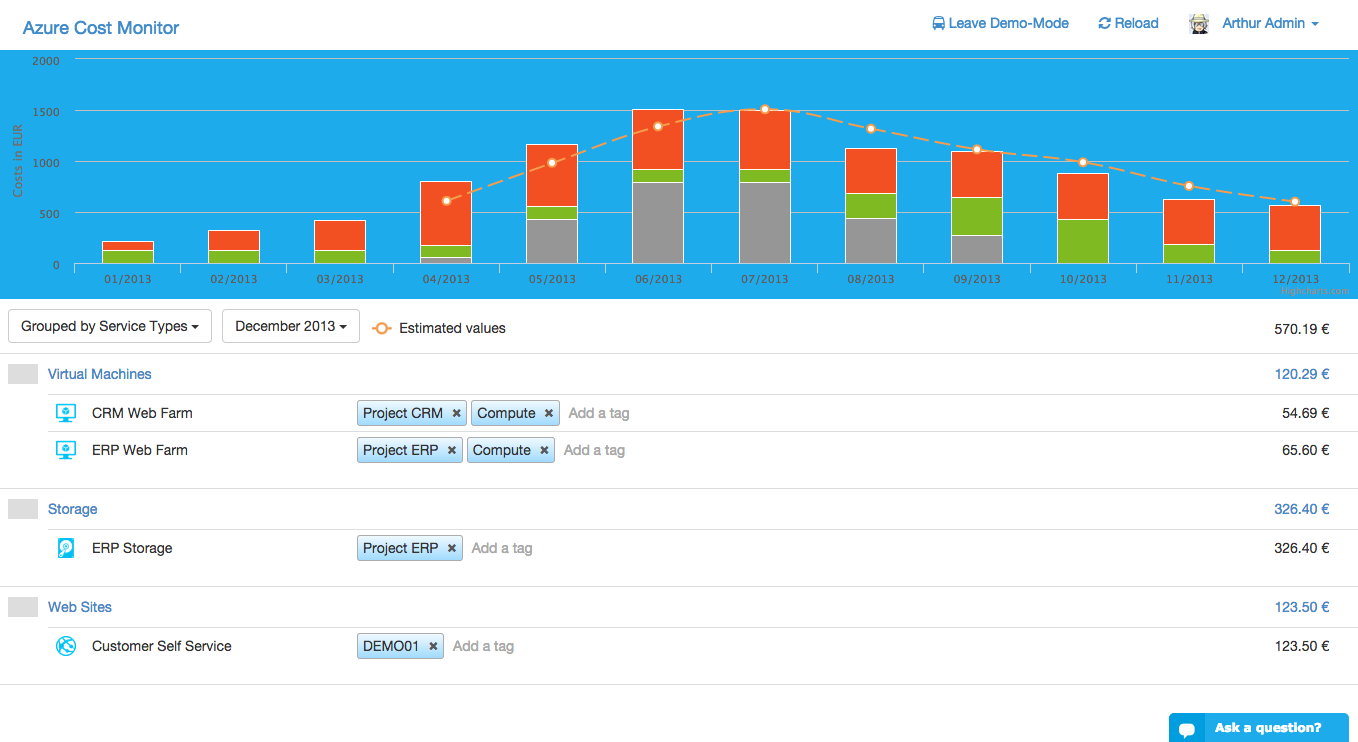
Clear cost control based on service types

The Microsoft Azure Cloud offers many different resources, e.g. virtual machines, cloud services or websites. Some of these resources produce comprehensible costs e.g. virtual machines, but some resources produce costs that are indirect and hard to analyse, like costs for “Data Traffic”, “Visual Studio Online” or “Data Management”.

Screen Shot 2014-12-06 at 12.11.51

To solve this problem and facilitate the cost control, all service types are now visible in the Azure Cost Monitor. The new category for grouping this service types helps to identify the cost drivers in different subscriptions and projects.

Azure Cost management with resource tagging

Starting with Microsoft Azure teams or small departments often begin with one subscription. When time goes by the subscription contains more and more resources without a simple option to migrate them into new project specific subscriptions. Managing costs for this kind of subscription is not easy. Because of that the Azure Cost Monitor now offers a new feature which should really help to stay in control.

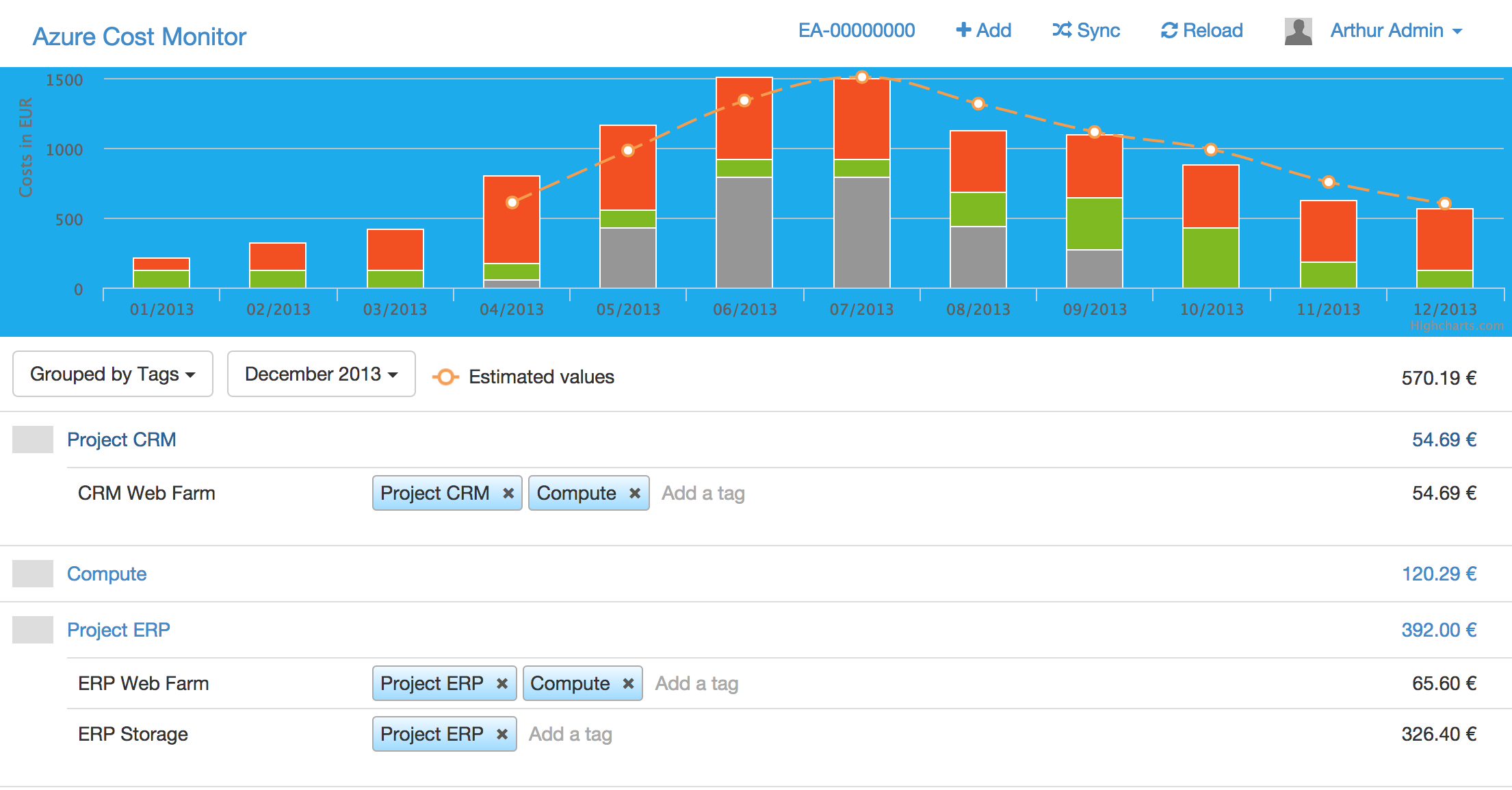
The new “Cost Tags” feature is an easy and comfortable way to categorize services. These tags can easily be used to visualize costs per responsible person, department, project or cost center. This allows cost management on a very granular level and aligned to the individual existing organisational structure.

The following screenshots show some best practices:

ScreenProjects
Categorize your services by project groups that are responsible for the costs

ScreenTypes
Categorize your services by resource type, e.g. storage or compute

This should really help to bring more control and transparancy into the Azure EA agreement. If you see any other requirements or needs feel free to drop the idea in our feedback portal.

BTW: As soon as Microsoft Azure delivers the new Azure resource tagging we will allow to mix up our custom tags and the Azure resource tags. There will be no need to do something manually from your side.

Azure Enterprise Agreement: Freedom & cost control

Microsoft offers a very lucrative deal for Azure customers: When your company is willing to do an upfront investment it’s possible to get an enterprise agreement. Besides dramatical price reduction this agreement gives your engineers the freedom to consume azure services as much as they need, the operations team is able to assign subscriptions for every team and your company gets an invoice that is compliant to local financial regulations.

But what about your financial controllers? How can they keep track of the costs to ensure that the the limits are not exceeded?

Here are some best practices that Microsoft offers to partly achieve this:

  1. Check your EA reports on a weekly basis
    Microsoft delivers weekly consumption report that need to be checked on a regular basis. A second important source is the monthly delivered summary e-mail about the monetary commitment balance.
  2. Assign your teams, business units or projects to different subscriptions
    Microsoft allows to create as many subscriptions as needed, this means it’s possible to give every team or project a separate subscription payed from the enterprise agreement. By that access rights and roles can be modelled.

After working with these two options I recognised that not all of my requirements to manage our costs efficiently were totally fulfilled:

  1. Multiple usage of the same service should be cumulated in one report entry.
  2. Analysing costs on subscription level without using a complex pivot table.
  3. Tagging different resources helps to manage multiple projects in a subscription.
  4. Cost-Prediction based on the data of the past months.
  5. Cost-Alerts when specific limits are exceed for enabled EA customers.

So I decided to build a little service based on the Azure platform, called Azure Cost Monitor:

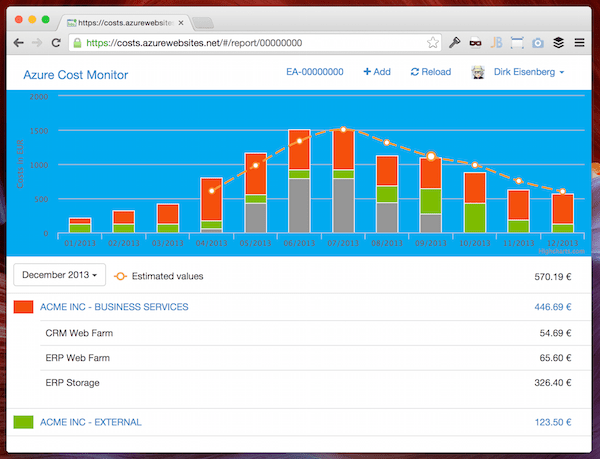
The service is able to process the CSV files from the EA portal and gives a graphical overview including subscription drill down. It is based on modern cloud technologies exclusively e.g. Azure Table Store, Azure WebSites and Azure WebJobs. That’s why the Azure Cost Monitor scales as good as Azure scales and I would like to invite all of you to join this service (https://costs.azurewebsites.net).

login

Login with your existing Azure Account or LiveId. After that enter your EA number to start analysing your data. An useful report about the cost consumption of your subscriptions will be shown. If you don’t want to enter your personal data right now, feel free to check the demo mode by adding the demo EA number:

Screen Shot 2014-10-18 at 21.44.52

I would like to extend this service aligned to the requirements you bring from the field, so please visit the feedback portal of the Azure Cost Monitor and enter your ideas or vote and comment for existing ones.

How to build a SaaS offering – Part 1

During the last weeks and month I had the opportunity to get an idea how different companies (Start-Ups and existing player) realized their software as a service offerings. In a series of blogs posts I would like to share technical ideas and best practices to realize similar projects. Let’s start with a couple of assumptions:

  • Most software as a service offerings are web based applications based on HTML, CSS and JavaScript (I will call them HTML5 apps)
  • Most software as a service offerings are using a specific web framework which is responsible for rendering the application, e.g. PHP, Ruby on Rails or ASP.NET MVC
  • Most software as a service offerings are implementing a multitenant ready backend (shared or isolated data storage)
  • Most software as a service offerings want to follow the paradigm “pay as you go” for their infrastructure

In the first part of this blog series I would like to focus on the “pay as you go” paradigm, which allows to scale out  your infrastructure just as you need (and of course to shrink if necessary) – be elastic 🙂

Traditional Web-Application-Architecture

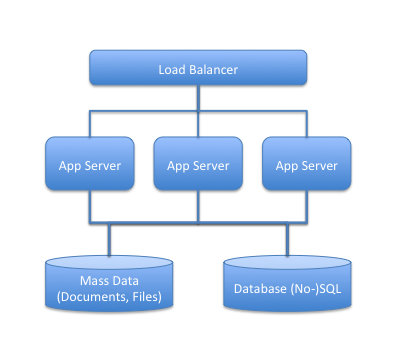
The good news is, many web applications are following the same main architecture shown below:

The system offers a storage backend for relational data (SQL or NO-SQL Database) and a way to store mass data (files, attachents, photos,….). On top of the storage backend the web worker is responsible for processing all user request in the system (complex applications have also background worker, of course). The load-balancer in front of the system delegates requests to the next free worker server.

Step a way from this picture and think about the requirements we have on the different roles and layers of our system:

  • Storage Backend
    • Highly Available
    • Reliable with support for backup and restore mechanisms
    • Fast / Reactive
  • Web-Worker (Computer Nodes)
    • Independent from each other
    • High processing rate
    • Stateless
  • Load-Balancer
    • SSL Manager
    • Highly Available

The components of an Infrastructure as a Service Provider

Today, Amazon AWS is not the exclusive IaaS provider but is one with a sophisticated infrastructure. I’m using Amazon AWS in these articles because you have the option to try it out for free, right now. Amazon offers a Free-Tier-Program for all new customers without any fee.

Let’s have a look what Amazon offers:

  • Storage Backend
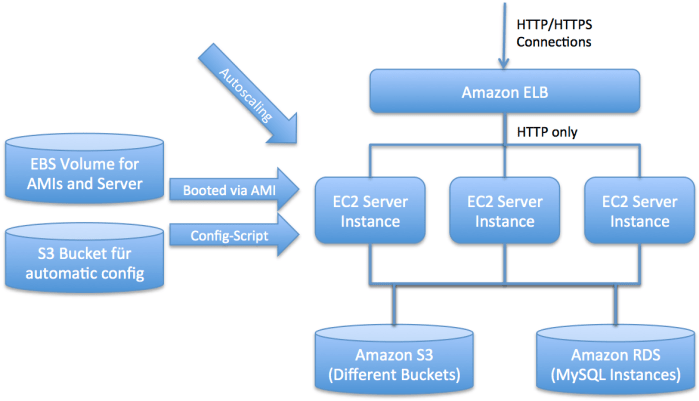
    • Amazon S3 – A highly scalable and distributed storage system for mass data, which allows storing nearly everything behind a unique key. Every element is accessible through a RESTful web service.
    • Amazon RDS – To make it simple, it’s MySQL for the Cloud. Amazon offers a multi site, sharded database system, which allows to create as many databases as you need.
  • Web-Worker
    • Amazon EC2 – The elastic cloud (EC2) allows to get virtual machines on demand as needed. This machines are provisioned based on an existing AMI (Amazone Machine Image) and will be provided immediately.
    • Amazon AutoScaling – The AutoScaling service allows to add new EC2 nodes into your cluster automatically and of course to reduce the amount of cluster of necessary –  be elastic J
  • Load Balancer
    • Amazon ELB – The Elastic Load Balancer is responsible for receiving all HTTP(S) request and redirects the request to a free node in the cluster. The ELB is also highly integrated in the AutoScaling service so  if needed the cluster behind the ELB can be expanded automatically.

Recap for our Web-Application-Architecture

With the new knowledge about the different components it’s easy to generate a new picture of the system (and I know there are many other ways to realize a solution but for me personally this solutions fits best):
And now?

In the next parts of this series I would like to cover some more detailed topics, e.g.

  • Build a Ruby on Rails application which relies on Amazon S3 and Amazon RDS as backend storage system
  • Bake an AMI for the EC2 nodes and handle the application deployment and upgrade scenarios
  • Rolling out a primary infrastructure with a minimum set on servers, load balancers and storage backends
  • Implement AutoScaling in detail to handle the first customer storm J
  • Calculate the CAPEX and OPEX for a SaaS offering